One place for every run
Add scripts and organize selected runs in one Windows workbench, with status and results close at hand.
PyRe GPU for Windows
Open the illustrated how-to guide →
Run your Python work from one Windows workbench. Queue scripts, set resource limits, and see how every run ends.
Free download for Windows. See current pricing and requirements in the Store on the Microsoft Store.
Every feature, in one place: read the full PyRe GPU guide.
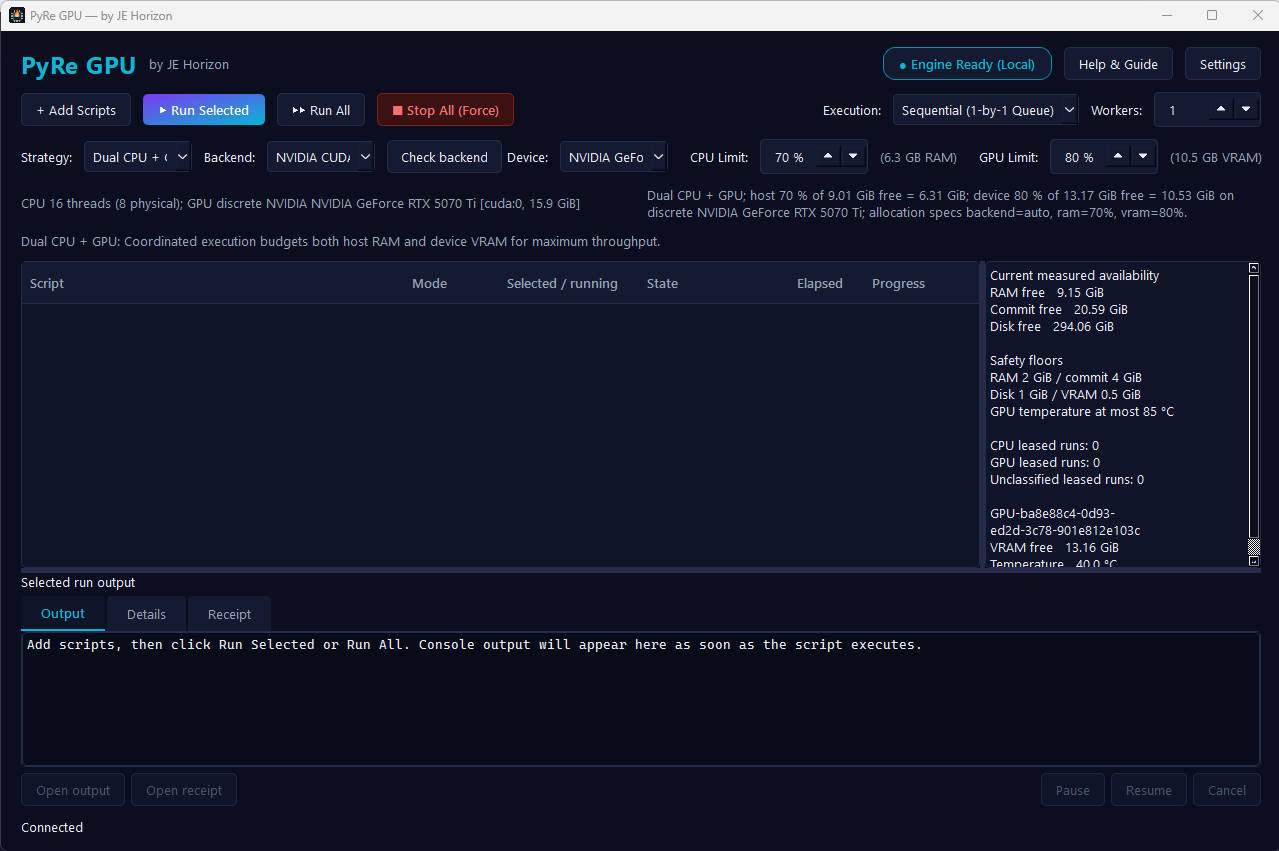
Less time juggling windows. More clarity about the work running on your PC.
Add scripts and organize selected runs in one Windows workbench, with status and results close at hand.
Review an allocation plan before a run and leave capacity for Windows and the other apps you have open.
See what started, what finished, and what needs attention. Keep a run record to check afterward.
See how to select a device, run a script, and compare its result. Acceleration depends on your code and compatible hardware.
GPU execution is optional. It depends on compatible Python code, supported hardware, matching drivers, and a separately configured environment. PyRe GPU does not turn ordinary CPU code into GPU code, and compatibility varies by device and workload. See the example script for a way to check a run.
No. PyRe GPU coordinates selected runs; your script must specify how it uses a device. Review code and commands before running them.
The Microsoft Store button on this page. The download is free; check the listing for system requirements and the installed app for any feature-trial details.
Free download for Windows from Microsoft Store. Check the installed app for any timed full-feature trial details.